Edge Computing
Tunnel Solution
A lightweight, high-performance proxy tunnel built on Cloudflare's global edge network. Supports VLESS, Trojan, and Shadowsocks with a built-in visual management panel and automated subscription generation.




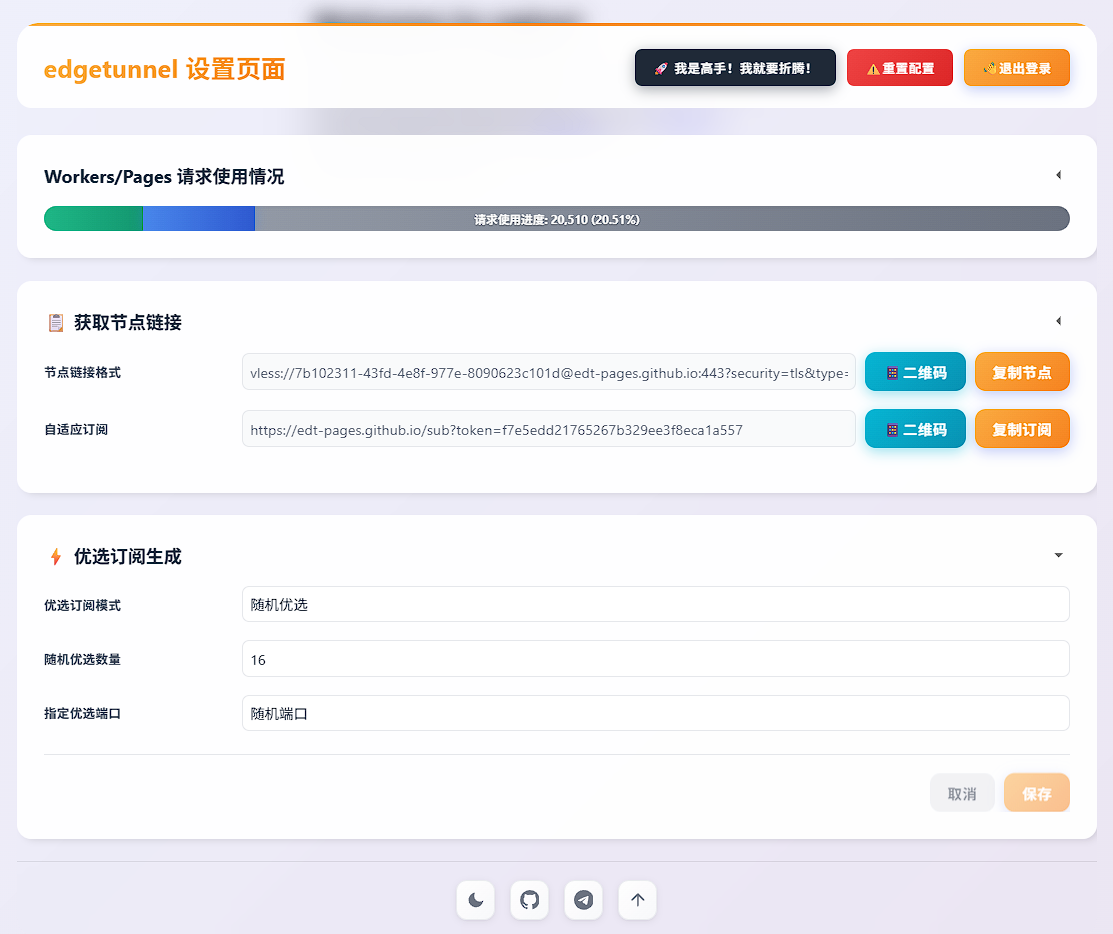
Management Dashboard
The built-in admin panel provides real-time control over node configuration, subscription links, traffic logs, and environment settings.
Everything you need
Purpose-built for Cloudflare's edge network — efficient, flexible, and easy to manage.
Multi-Protocol Support
Supports VLESS, Trojan, and Shadowsocks — mainstream proxy protocols with deep encryption integration out of the box.
Visual Management Panel
Built-in dashboard for real-time configuration, log viewing, traffic statistics, and subscription link management.
Flexible Deployment
Fully compatible with Cloudflare Workers and CF Pages via GitHub integration or direct ZIP upload.
Subscription System
Automated subscription generation with obfuscation conversion for Clash, Sing-box, and Surge clients.
Performance Optimization
Custom ProxyIP, SOCKS5/HTTP chain proxies, and latency optimization APIs for the fastest routes.
Multi-Platform Ready
Works on Windows, Android, iOS, macOS, and router firmwares. Full M1/M2 chip compatibility.
Get started in minutes
Three deployment methods — Pages upload is recommended for most users. Full visual guide available at cmliussss.com.
- Download main.zip and give the repository a ⭐ Star.
- In Cloudflare Pages, click Upload Assets, name your project, upload
main.zip, then click Deploy Site. - After deployment, go to Settings → Environment Variables → Production → Add Variable. Name:
ADMIN, value: your password. Click Save. - Return to Deployments → Create New Deployment, re-upload
main.zip, and click Save and Deploy. - Under Settings → Bindings → + Add → KV Namespace, set variable name
KV, choose or create a namespace, save, and redeploy. - Optionally bind a custom CNAME domain. Access your panel at
https://your-domain/admin.
- In Cloudflare Workers, create a new Worker and paste the full contents of _worker.js.
- Under Settings → Variables → Add Variable, set name
ADMINand enter your admin password. - Under Bindings → Add Binding → KV Namespace, set variable name
KVand select or create a namespace. - Under Triggers → Add Custom Domain, enter a CF-managed subdomain (e.g.
vless.example.com). Wait for certificate. - Access admin at
https://vless.example.com/adminand log in.
- Fork cmliu/edgetunnel on GitHub and give it a ⭐ Star.
- In CF Pages → Connect to Git, select your fork and click Begin Setup.
- Under Environment Variables (Advanced), add
ADMINwith your password, then Save and Deploy. - Under Settings → Bindings → + Add → KV Namespace, set variable name
KV, save, and redeploy. - Optionally set a custom CNAME domain. Access admin at
https://your-domain/admin.
# Custom ProxyIP
/proxyip=proxyip.cmliussss.net
/?proxyip=proxyip.cmliussss.net

# SOCKS5 proxy
/socks5=user:password@127.0.0.1:1080
/socks5://user:password@127.0.0.1:1080

# HTTP proxy
/http=user:password@127.0.0.1:1080
/http://user:password@127.0.0.1:8080
Environment Variables
Set these in your Cloudflare Workers or Pages environment settings to customize behavior.
| Variable | Required | Example | Description |
|---|---|---|---|
| ADMIN | ✓ | 123456 | Admin panel login password |
| KEY | — | CMLiussss | Quick subscription path key — access /KEY to retrieve nodes instantly |
| UUID | — | 90cd4a77-... | Force a fixed UUIDv4 for node authentication (must be valid UUIDv4 format) |
| PROXYIP | — | proxyip.cmliussss.net:443 | Global custom reverse proxy IP address |
| URL | — | https://cloudflare-error... | Fake homepage URL for camouflage (web URL or 1101) |
| GO2SOCKS5 | — | blog.cmliussss.com,*google.com | Domain list forced through SOCKS5 (* = global, comma-separated) |
| DEBUG | — | 1 or true | Enable developer debug logging (off by default) |
| OFF_LOG | — | 1 or true | Disable request logging (logging on by default) |
| BEST_SUB | — | 1 or true | Enable optimized subscription generator mode |
| PRELOAD_RACE_DIAL | — | 1 or true | Enable preload race dial for faster connection initialization |
Supported Clients
Works with all major client applications across every platform.
🪟 Windows
- v2rayN
- FlClash
- mihomo-party
- Clash Verge Rev
🤖 Android
- ClashMeta for Android
- FlClash
- v2rayNG
🍎 iOS
- Surge
- Shadowrocket
- Stash
🖥️ macOS
- FlClash
- mihomo-party
- Clash Verge Rev
- Surge — M1/M2 ✓
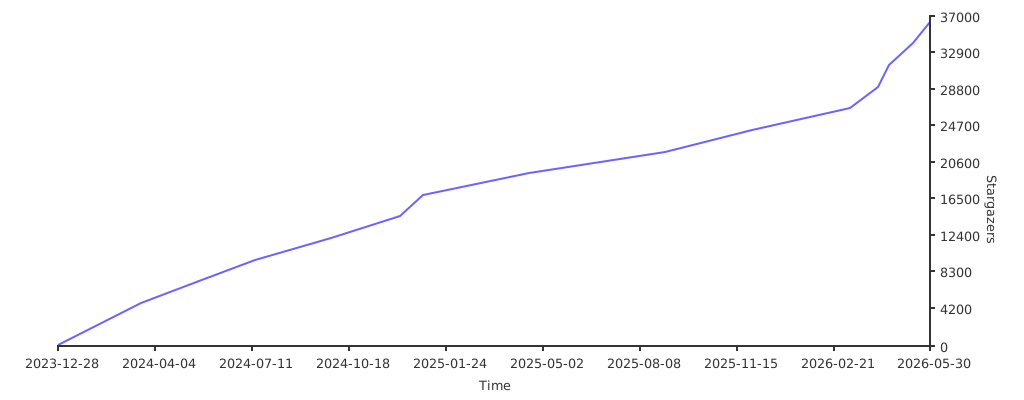
Star History
Growing rapidly — trusted by thousands of developers worldwide.
Special Thanks
Built with gratitude to open-source contributors and generous sponsors.
⚠️ Disclaimer
- This project is intended solely for educational, scientific research, and personal security testing purposes.
- Users must strictly comply with all applicable local laws and regulations when using this project.
- The author cmliu assumes no responsibility for any behavior or consequences resulting from misuse.
- This project is not liable for any direct or indirect damages arising from use of the code.
- It is recommended to delete all related deployments within 24 hours after testing is complete.